
Just in time for the holidays, you can send the gift of an app right from your iPad or other iOS device running iOS 6. Here’s how:
Launch the App Store
Select an app that costs at least $0.99
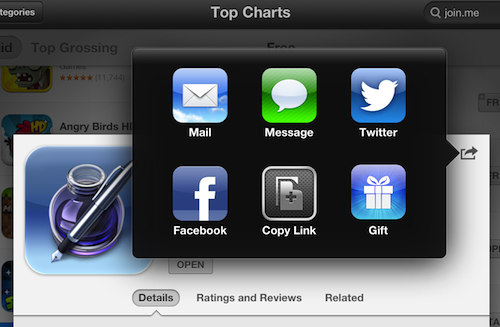
Tap the sharing icon (box with arrow) in the upper right
Tap the Gift button
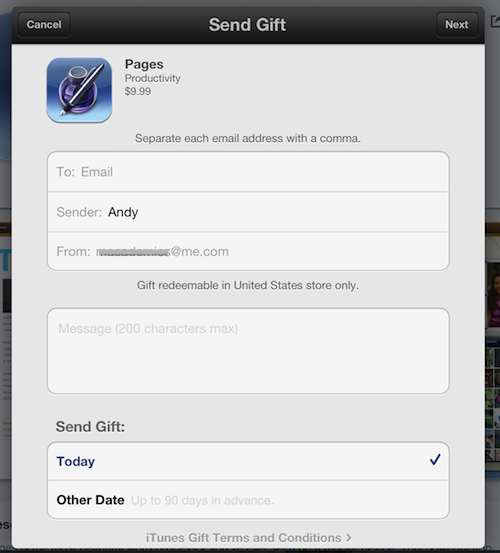
Enter the email address of the recipient and your name and email address.
Include a short message if you wish.
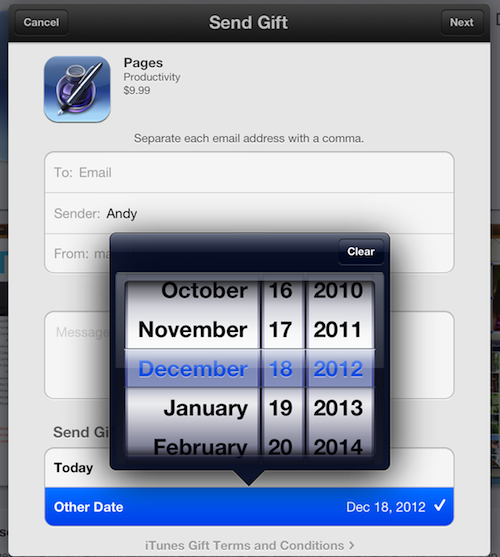
You can choose to send the gift immediately or schedule it for delivery on a certain date.
Appy holidays everyone!
Posted on 18 December 2012
Tags: app store, apps, how to
About the Author
Dr. Andy Brovey, The Portable Prof, has over twenty-five years experience in educational technology, including teaching, administration and professional development. In 2007, Apple Inc. recognized his work and named him an Apple Distinguished Educator. Andy now runs a professional development business, working on site and online to help others make sense and make use of digital tools. He started the iPad Academy blog shortly after the first iPad went on sale, and is the author of the self-published eBook - iPad Academy: Tips, Tricks and Clever Techniques. He also created and directs the iPad Academy Master Class, an online video training series to help others become more comfortable and competent with the iPad. Video Message from Andy
Written by Andy Brovey
Topics: App Tips & Tutorials